
Lists in Python
Say you're keeping a shopping list. You could make a separate variable for each item: item1, item2, item3. But that turns into a mess fast: you can't insert an item in the middle, you can't count how many items there are, and you can't go through them all in turn. You need one variable that holds many values in order. That's a list.
Python 3.13shopping = ["bread", "milk", "eggs"] print(shopping)['bread', 'milk', 'eggs']
From this definition follow four properties we'll rely on going forward:
- Order is preserved — elements stay in the order you added them
- A list is mutable — after creation you can add and remove elements
- Access by index — any element can be reached by its position
- Duplicates are allowed — the same value can appear multiple times
Creating lists
There are several ways to create lists in Python:
Using square brackets []
Python 3.13# Empty list empty_list = [] print(empty_list)[]# List of numbers numbers = [1, 2, 3, 4, 5] print(numbers)[1, 2, 3, 4, 5]# List of different data types mixed = [1, "hello", True, 3.14] print(mixed)[1, 'hello', True, 3.14]# Nested lists (list of lists) matrix = [[1, 2, 3], [4, 5, 6], [7, 8, 9]] print(matrix)[[1, 2, 3], [4, 5, 6], [7, 8, 9]]
Using the list() constructor
Python 3.13# Creating an empty list empty_list = list() print(empty_list)[]# Creating a list from a string (each character becomes an element) chars = list("Python") print(chars)['P', 'y', 't', 'h', 'o', 'n']# Creating a list from other iterable objects tuple_to_list = list((1, 2, 3)) print(tuple_to_list)[1, 2, 3]
Accessing list elements
Indexing
In Python, indexing starts at 0, meaning the first element has index 0, the second one has index 1, and so on:
Python 3.13fruits = ["apple", "banana", "cherry", "pear", "orange"] # Getting elements by index first_fruit = fruits[0] print(f"First fruit: {first_fruit}")First fruit: apple# Negative indices for accessing from the end of the list last_fruit = fruits[-1] print(f"Last fruit: {last_fruit}")Last fruit: orangesecond_last = fruits[-2] print(f"Second to last fruit: {second_last}")Second to last fruit: pear
Slices
Slices allow you to get a sublist by specifying start and end indices:
Python 3.13fruits = ["apple", "banana", "cherry", "pear", "orange"] # Slice syntax: list[start:end:step] # Start is included, end is not included! # First three elements first_three = fruits[0:3] print(f"First three fruits: {first_three}")First three fruits: ['apple', 'banana', 'cherry']# Same thing, but the starting index can be omitted if it's 0 first_three = fruits[:3] print(f"First three fruits: {first_three}")First three fruits: ['apple', 'banana', 'cherry']# Every second element every_second = fruits[::2] print(f"Every second fruit: {every_second}")Every second fruit: ['apple', 'cherry', 'orange']# Reversing the list reversed_list = fruits[::-1] print(f"List in reverse order: {reversed_list}")List in reverse order: ['orange', 'pear', 'cherry', 'banana', 'apple']
Looping over a list
Reaching for elements by index is handy when you need one or two. But to go through them all, there's a shorter way — the for loop you already know:
Python 3.13fruits = ["apple", "banana", "cherry"] for fruit in fruits: print(f"Fruit: {fruit}")Fruit: apple Fruit: banana Fruit: cherry
To ask how many elements a list holds, use the len() function:
Python 3.13fruits = ["apple", "banana", "cherry"] print(f"Fruits in total: {len(fruits)}")Fruits in total: 3
Sometimes you need the position along with the element. No need for a separate counter variable — enumerate() hands you the index and the value as a pair:
Python 3.13fruits = ["apple", "banana", "cherry"] for index, fruit in enumerate(fruits): print(f"Index {index}: {fruit}")Index 0: apple Index 1: banana Index 2: cherry
Modifying list elements
The key difference from strings: lists are mutable. A string can't be changed in place — you have to build a new one (recall the strings lesson). But list elements can be changed, added, and removed inside the existing object:
Python 3.13fruits = ["apple", "banana", "cherry"] # Changing an element fruits[0] = "kiwi" print(fruits)['kiwi', 'banana', 'cherry']# Changing multiple elements using a slice numbers = [1, 2, 3, 4, 5] numbers[1:4] = [20, 30, 40] print(numbers)[1, 20, 30, 40, 5]# You can even replace multiple elements with a different number of elements numbers = [1, 2, 3, 4, 5] numbers[1:4] = [20, 30] print(numbers)[1, 20, 30, 5]
Main list methods
Python provides many built-in methods for working with lists:
Adding elements
Python 3.13fruits = ["apple", "banana"] # Adding an element to the end of the list fruits.append("cherry") print(fruits)['apple', 'banana', 'cherry']# Inserting an element at a specific position fruits.insert(1, "orange") print(fruits)['apple', 'orange', 'banana', 'cherry']# Adding elements from another list more_fruits = ["pear", "grape"] fruits.extend(more_fruits) print(fruits)['apple', 'orange', 'banana', 'cherry', 'pear', 'grape']# Combining lists using the + operator combined = fruits + ["pineapple", "mango"] print(combined)['apple', 'orange', 'banana', 'cherry', 'pear', 'grape', 'pineapple', 'mango']
Removing elements
Python 3.13fruits = ["apple", "banana", "cherry", "orange", "banana"] # Removing an element by value (removes only the first occurrence) fruits.remove("banana") print(fruits)['apple', 'cherry', 'orange', 'banana']# Removing an element by index and returning its value removed = fruits.pop(1) print(f"Removed: {removed}")Removed: cherryprint(f"List after removal: {fruits}")List after removal: ['apple', 'orange', 'banana']# If no index is specified, pop() removes and returns the last element last = fruits.pop() print(f"Last element: {last}")Last element: bananaprint(fruits)['apple', 'orange']# Removing all elements from the list fruits.clear() print(f"Empty list: {fruits}")Empty list: []# The del operator for removing elements by index or slice numbers = [1, 2, 3, 4, 5] del numbers[0] print(numbers)[2, 3, 4, 5]del numbers[1:3] print(numbers)[2, 5]
Finding and counting elements
Python 3.13fruits = ["apple", "banana", "cherry", "banana", "pear"] # Checking if an element is in the list print("banana" in fruits)Trueprint("watermelon" in fruits)False# Finding the index of the first occurrence of an element banana_index = fruits.index("banana") print(f"Index of the first banana: {banana_index}")Index of the first banana: 1# Counting the number of occurrences of an element banana_count = fruits.count("banana") print(f"Number of bananas: {banana_count}")Number of bananas: 2
Sorting and reversing
Python 3.13# Sorting a list (modifies the original list) numbers = [3, 1, 4, 1, 5, 9, 2] numbers.sort() print(f"Sorted list: {numbers}")Sorted list: [1, 1, 2, 3, 4, 5, 9]# Sorting in reverse order numbers.sort(reverse=True) print(f"Reverse sort: {numbers}")Reverse sort: [9, 5, 4, 3, 2, 1, 1]# If you don't want to modify the original list, use sorted() original = [3, 1, 4, 1, 5] sorted_list = sorted(original) print(f"Original: {original}")Original: [3, 1, 4, 1, 5]print(f"Sorted copy: {sorted_list}")Sorted copy: [1, 1, 3, 4, 5]
Copying lists
This is one of the most common sources of bugs for beginners: assigning a list does not create a copy. Both variables point to the same object in memory. If you change the list through one variable, the other will see the change.
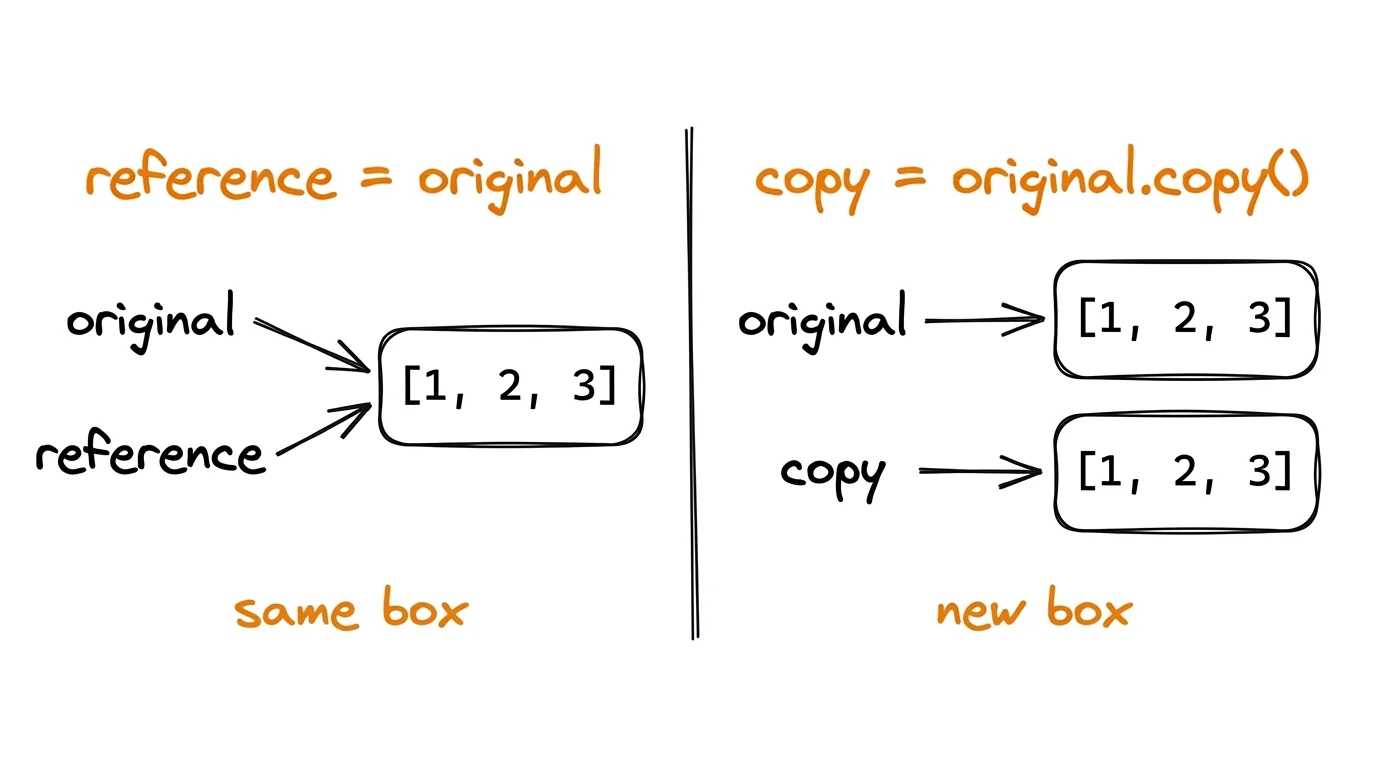
Python 3.13# Create a list original = [1, 2, 3] # Assignment doesn't create a copy — both variables point to the same list reference = original reference.append(4) print(f"Original after changing the reference: {original}")Original after changing the reference: [1, 2, 3, 4]# Correct ways to copy a list: # 1. The copy() method copy1 = original.copy() # 2. Using slice [:] copy2 = original[:] # 3. The list() function copy3 = list(original) # Let's check that the copies are not linked to the original copy1.append(5) print(f"Original: {original}")Original: [1, 2, 3, 4]print(f"Copy 1: {copy1}")Copy 1: [1, 2, 3, 4, 5]
List comprehensions
A very common task: take one list and build another from it. Done plainly, that's a few lines — set up an empty list, walk it with a loop, append one by one:
Python 3.13squares = [] for i in range(10): squares.append(i**2) print(squares)[0, 1, 4, 9, 16, 25, 36, 49, 64, 81]
Common enough that Python has a shorthand for it — the list comprehension. Same result, one line:
Python 3.13squares = [i**2 for i in range(10)] print(squares)[0, 1, 4, 9, 16, 25, 36, 49, 64, 81]
Read it not left to right but starting from the for: for i in range(10) is where the values come from, i**2 is what goes into the new list. You can add a condition at the end, and then only the matching values make it through:
Python 3.13even_squares = [i**2 for i in range(10) if i % 2 == 0] print(even_squares)[0, 4, 16, 36, 64]
The temptation to cram everything into one line is strong, but a comprehension is good exactly as long as it reads at a glance. Once two conditions and a nested loop want in, a plain for will be clearer — both for you and for whoever opens the code six months from now.
Practical example of using a list
Python 3.13# List of students and their grades students = ["Anna", "John", "Maria", "Peter", "Elena"] grades = [95, 82, 90, 78, 88] # Finding the student with the highest score highest_score = max(grades) top_student_index = grades.index(highest_score) print(f"Best student: {students[top_student_index]} with a grade of {highest_score}")Best student: Anna with a grade of 95
Understanding check
Which of the following methods will correctly create a copy of a list that is not linked to the original?