
Third-party libraries and pip
Say we have a sales export in front of us: a list of receipts, each with a product, a quantity, and a price. We need the revenue per product.
Everything required is something we have already covered — a dictionary and a loop:
Python 3.13sales = [ {"product": "Coffee", "quantity": 3, "price": 150}, {"product": "Bread", "quantity": 2, "price": 60}, {"product": "Coffee", "quantity": 1, "price": 150}, {"product": "Milk", "quantity": 4, "price": 45}, {"product": "Bread", "quantity": 2, "price": 60}, ] revenue = {} for row in sales: revenue[row["product"]] = revenue.get(row["product"], 0) + row["quantity"] * row["price"] print(revenue){'Coffee': 600, 'Bread': 240, 'Milk': 180}
It works. The trouble starts with the next request: sort it descending, compute the average receipt, drop anything under a hundred, group by day as well. Every item is one more loop, and an hour later you are looking at three hundred lines nobody wants to touch.
Yet the task is an ordinary one; thousands of people solve it every day. So a tool for it was written long ago: the pandas library.
The same thing in pandas
Python 3.13import pandas as pd sales = [ {"product": "Coffee", "quantity": 3, "price": 150}, {"product": "Bread", "quantity": 2, "price": 60}, {"product": "Coffee", "quantity": 1, "price": 150}, {"product": "Milk", "quantity": 4, "price": 45}, {"product": "Bread", "quantity": 2, "price": 60}, ] table = pd.DataFrame(sales) table["total"] = table["quantity"] * table["price"] print(table.groupby("product")["total"].sum().to_string())product Bread 240 Coffee 600 Milk 180
The loop collapsed into a single line that almost reads as English: group by product, take the "total" column, add it up. And the sorting that would have cost you extra code is one more call in the same chain:
Python 3.13import pandas as pd sales = [ {"product": "Coffee", "quantity": 3, "price": 150}, {"product": "Bread", "quantity": 2, "price": 60}, {"product": "Coffee", "quantity": 1, "price": 150}, {"product": "Milk", "quantity": 4, "price": 45}, {"product": "Bread", "quantity": 2, "price": 60}, ] table = pd.DataFrame(sales) table["total"] = table["quantity"] * table["price"] print(table.groupby("product")["total"].sum().sort_values(ascending=False).to_string())product Coffee 600 Bread 240 Milk 180
This is what third-party libraries are for. Somebody already walked the path from "sum numbers per group" to "filter, recompute and draw a chart", debugged it across thousands of other people's projects, and handed it to you finished.
Where they come from
What arrives together with Python is only the standard library, and pandas is not part of it. On a clean machine the line import pandas ends in a ModuleNotFoundError until the package is installed.
They are downloaded and installed by pip, the package manager that arrives together with Python. To check it is there:
pip --version
Where to install: the environment comes first
By default pip puts the package where Python itself lives, and from that moment every program of yours sees it. While there is one program, that is convenient. Once there are two, it turns out the old one needs django 3.0 and the new one django 4.2, and two versions cannot sit in one place. Upgrade for the new one and you break the old one.
That's why every project gets its own virtual environment: a set of packages that knows nothing about the neighbours.
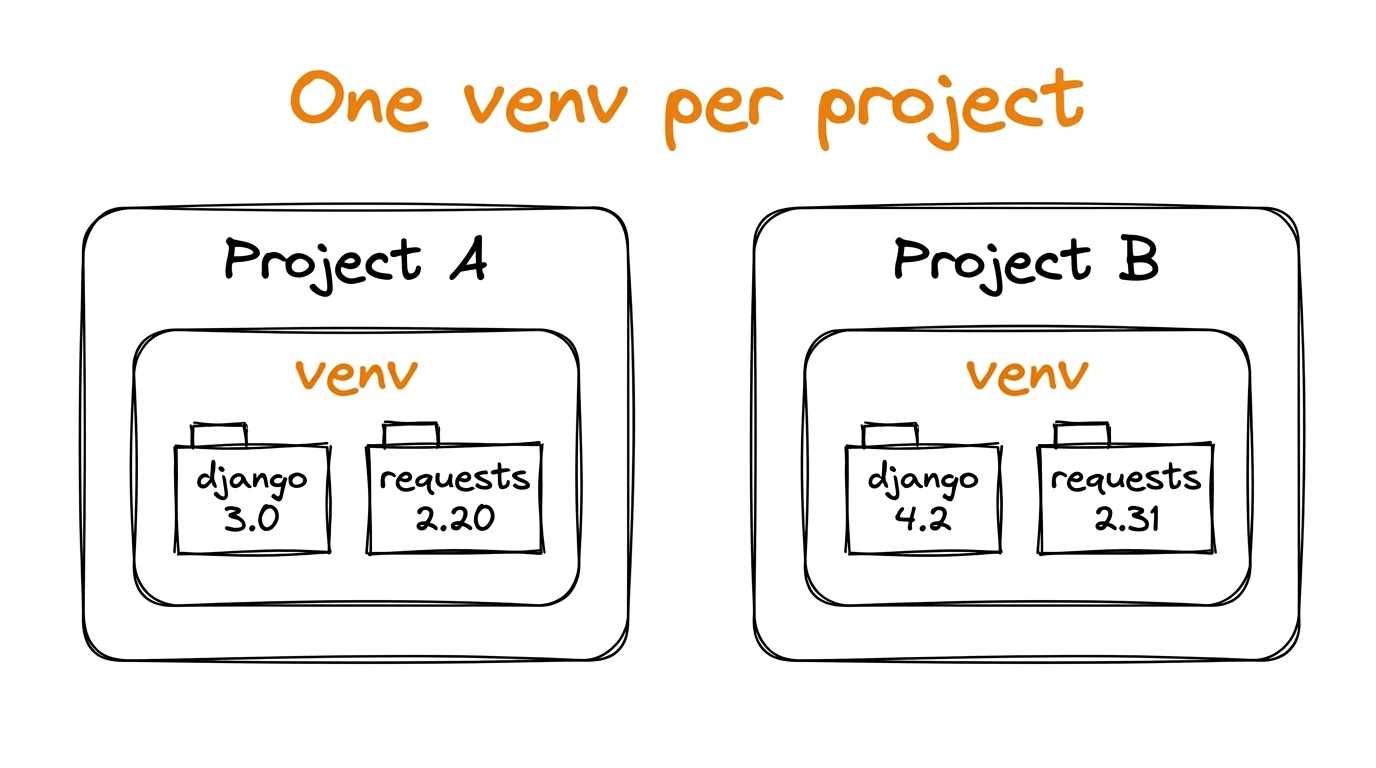
We create the environment and step into it:
python -m venv myenv
source myenv/bin/activate
You can tell you are inside by the start of the prompt, where the environment name shows up:
(myenv) $
Installing a package
While the environment is active, pip puts packages into it rather than into the shared folder:
pip install pandas
If you need a specific version, spell it out after a double equals sign:
pip install pandas==2.0.3
To see what is already installed, use pip list. To remove something, pip uninstall pandas.
So the same thing builds for a colleague
The environment stays on your machine, while only the code travels to the repository. So that your colleague and the server end up with exactly the same versions, the dependency list is saved to a file:
pip freeze > requirements.txt
Inside it, one package and its exact version per line:
numpy==1.25.2
pandas==2.0.3
python-dateutil==2.8.2
The file goes into the repository next to the code, and from then on anyone who clones the project reproduces the environment with one command:
pip install -r requirements.txt
The versions are pinned, so what they get is exactly what you have, instead of "well, it works on my machine".
Where to go next
PyPI holds hundreds of thousands of packages, but a handful is enough to start with:
The rest you look up on PyPI at the moment you hit the task. There is no need to memorise the list in advance 🎓.
Understanding Check
Why does every project get its own virtual environment?