
Threads and processes in Python
Eight heavy computations through a ThreadPoolExecutor take about twelve seconds. Change one word — Thread to Process — and the same eight finish in three or four. That gap is the whole difference between threads and processes.
You remember the split from the intro: threads (threading) for I/O, processes (multiprocessing) for computation. This article covers both. The APIs are nearly identical, so once you learn one the other comes for free.
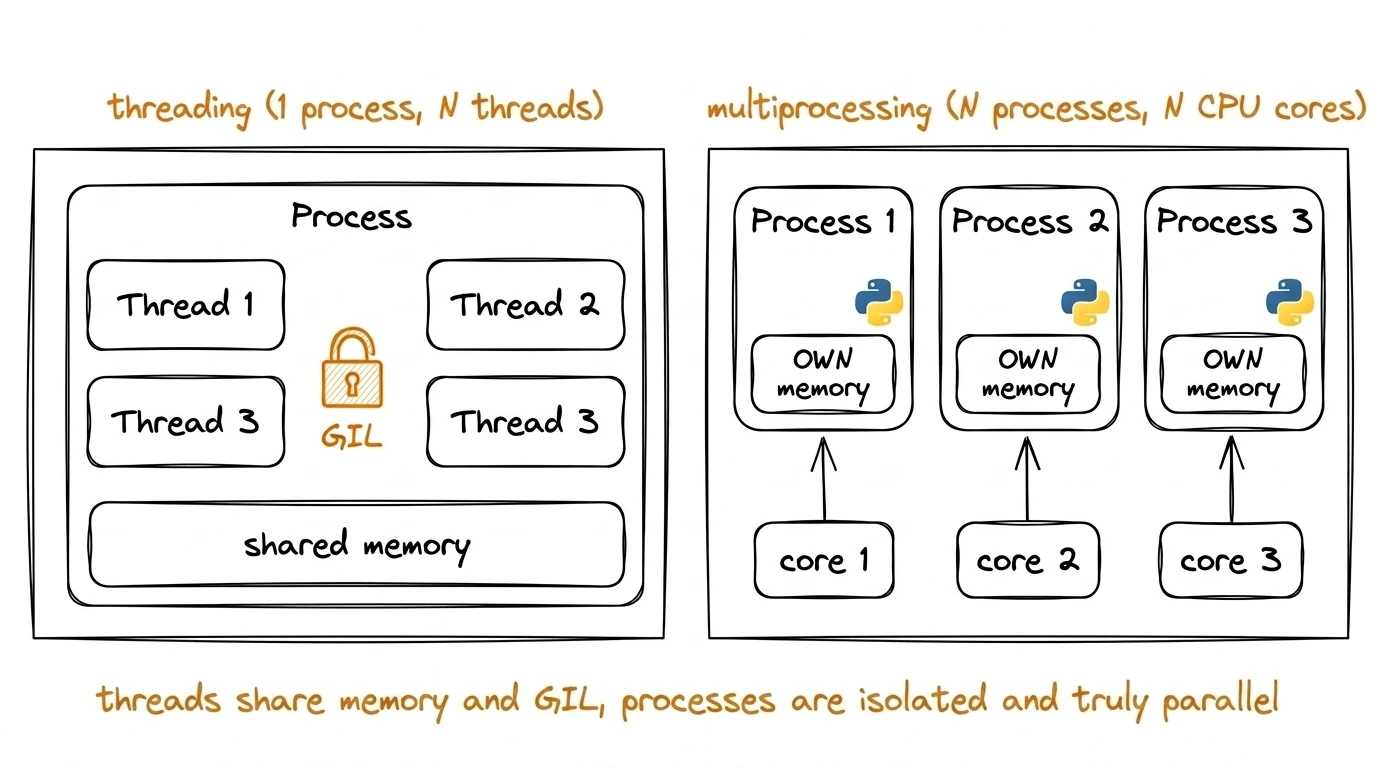
threading: threads inside one process
You create a thread via threading.Thread, passing it a target function and arguments:
Python 3.13import threading import time def worker(name, sleep_time): print(f"Thread {name}: sleeping for {sleep_time}s") time.sleep(sleep_time) print(f"Thread {name}: done") t1 = threading.Thread(target=worker, args=("A", 2)) t2 = threading.Thread(target=worker, args=("B", 1)) t1.start() # start t2.start() t1.join() # wait for completion t2.join() print("All threads done")
- target — the function the thread runs
- args — a tuple of arguments
- start() — starts the thread
- join() — blocks the calling thread until this one finishes
When you run this, you'll see something like:
Thread A: sleeping for 2s
Thread B: sleeping for 1s
Thread B: done
Thread A: done
All threads done
Thread B started second but finished first — its sleep is shorter, and t1.join() waits specifically for A to finish. That's concurrent execution: threads run side by side, and finish order depends on the work, not the launch order.
Protecting shared data: Lock
Threads share memory. If two threads modify the same variable without protection, the result is unpredictable (race condition). Let's look: five threads each increment a counter a million times, so we should get 5,000,000.
Python 3.13import threading counter = 0 def increment(): global counter for _ in range(1_000_000): counter += 1 threads = [threading.Thread(target=increment) for _ in range(5)] for t in threads: t.start() for t in threads: t.join() print(counter) # e.g. 3137095 — and a different number every run
We expected 5,000,000 but got less — and next time the number will differ. The reason: counter += 1 isn't one action but three (read the value, add one, write it back), and threads sneak in between the steps, overwriting each other's increments. The fix is a Lock: while one thread is inside with lock, the others wait their turn.
Python 3.13import threading counter = 0 lock = threading.Lock() def increment(): global counter for _ in range(1_000_000): with lock: # automatic acquire/release counter += 1 threads = [threading.Thread(target=increment) for _ in range(5)] for t in threads: t.start() for t in threads: t.join() print(counter) # 5000000 — now always correct
The with lock: context manager is the standard usage: it guarantees release even on exceptions. threading also has Event, Semaphore, Condition, RLock. In practice, Lock and Queue (next section) cover 90% of cases. The rest is for non-trivial coordination.
Sharing data between threads: queue.Queue
Manipulating shared variables directly is dangerous (Lock everywhere). Cleaner and safer: pass data through a thread-safe queue from the queue module:
Python 3.13import threading import queue import time q = queue.Queue() def producer(): for i in range(5): q.put(f"item-{i}") time.sleep(0.1) q.put(None) # "no more" signal def consumer(): while True: item = q.get() if item is None: break print(f"Got {item}") t_prod = threading.Thread(target=producer) t_cons = threading.Thread(target=consumer) t_prod.start() t_cons.start() t_prod.join() t_cons.join()
q.put() blocks if the queue is full (for bounded queues), q.get() blocks if it's empty. All necessary locks are inside.
q.put(None) at the end of the producer is a convention between producer and consumer: "no more data coming". Queue has no built-in "end of stream" signal, so it's agreed by hand, and None is just the most common pick. Any value that can't appear as valid data will work.
multiprocessing: true parallelism
The API is almost identical to threading, but it creates separate processes instead of threads. Each has its own interpreter, its own memory, its own GIL. Multiple processes really do run at once on different cores.
Python 3.13import multiprocessing import time def heavy_calc(n): print(f"Process computing for n={n}") total = sum(i * i for i in range(n)) return total if __name__ == "__main__": # required guard p1 = multiprocessing.Process(target=heavy_calc, args=(10_000_000,)) p2 = multiprocessing.Process(target=heavy_calc, args=(10_000_000,)) p1.start() p2.start() p1.join() p2.join() print("Both processes done")
The if __name__ == "__main__": guard is required on Windows and macOS. Without it, child processes will try to re-run the whole module and fall into infinite recursion of process creation. Get into the habit right away.
Sharing data between processes: Queue
Processes are isolated (their own memory), so shared variables don't work; data passes through a special mechanism. The most convenient one is multiprocessing.Queue, with the same API as queue.Queue:
Python 3.13import multiprocessing def producer(q): for i in range(3): q.put(f"item-{i}") q.put(None) def consumer(q): while True: item = q.get() if item is None: break print(f"Got {item}") if __name__ == "__main__": q = multiprocessing.Queue() p1 = multiprocessing.Process(target=producer, args=(q,)) p2 = multiprocessing.Process(target=consumer, args=(q,)) p1.start() p2.start() p1.join() p2.join()
Besides Queue, there's Pipe (for two processes), Value/Array (for shared primitives) and Manager (shared lists/dicts via a server process). These are rare; Queue + Pool (below) cover most cases.
Process pool for CPU-bound tasks
Creating a process by hand for each task is expensive. multiprocessing.Pool builds a pool of N processes and distributes tasks among them:
Python 3.13import multiprocessing def heavy_square(x): # simulating CPU-heavy work return sum(i * i for i in range(x * 100_000)) if __name__ == "__main__": with multiprocessing.Pool(processes=4) as pool: results = pool.map(heavy_square, range(1, 9)) print(results)
pool.map(func, items) applies the function to each item, spreading the work across pool processes. The context manager closes the pool and joins the processes for you.
concurrent.futures: unified API for threads and processes
The concurrent.futures module wraps both approaches in a higher-level API. The same code works with threads or processes; you just change the executor class:
Python 3.13from concurrent.futures import ThreadPoolExecutor, ProcessPoolExecutor def task(x): return x * x # if __name__ is needed for ProcessPoolExecutor: it spawns processes if __name__ == "__main__": # For I/O-bound: threads with ThreadPoolExecutor(max_workers=4) as executor: results = list(executor.map(task, range(10))) # For CPU-bound: processes — only the executor class changes with ProcessPoolExecutor(max_workers=4) as executor: results = list(executor.map(task, range(10)))
This is the most practical way to parallelize simple tasks. In modern code concurrent.futures shows up more often than raw threading.Thread or multiprocessing.Process.
When to pick what
For high-volume I/O, asyncio is better: single thread, minimal switching overhead. But it requires rewriting the code in async style.
Understanding check
Why does multiprocessing work for CPU-bound tasks while threading does not?
The next two articles cover asyncio: the third and most efficient way to organize concurrent I/O. It really shines for web servers, bots, and API clients.