pytest: Fixtures, Parametrization, and Advanced Tests

In the previous article, we got acquainted with the basics of pytest: we learned how to write and run simple tests. Now it's time to delve into two of the most powerful and frequently used concepts in pytest that make it so flexible and convenient: fixtures and parametrization.

Fixtures: Preparing and Managing the Test Environment ⚙️

Often, to run a test, you need to perform some preliminary actions: prepare data, set up a test object, establish a database connection, etc. After the test, you might need to perform cleanup: delete temporary files, close connections.

Fixtures in pytest are functions that serve to set up and provide data or objects needed for your tests. They help make tests cleaner, more structured, and avoid code duplication.

Creating a Simple Fixture

A fixture is defined using the @pytest.fixture decorator.

test_fixtures_example.py
1import pytest2 3@pytest.fixture4def sample_list():5print("\n(Fixture sample_list: creating list)")6return [1, 2, 3, 4, 5]7 8@pytest.fixture9def sample_dict():10print("\n(Fixture sample_dict: creating dictionary)")11return {"name": "Alice", "age": 30}12 13def test_list_length(sample_list): # fixture name is passed as an argument14print("(Test test_list_length)")15assert len(sample_list) == 516 17def test_dict_name(sample_dict): # another fixture18print("(Test test_dict_name)")19assert sample_dict["name"] == "Alice"20 21def test_list_and_dict_usage(sample_list, sample_dict):22print("(Test test_list_and_dict_usage)")23assert len(sample_list) > 024assert "age" in sample_dict25 

If you run pytest -v -s (the -s flag is needed to see the print outputs from fixtures and tests):

  • pytest will execute each fixture before the test that requests it.
  • The result of the fixture execution (what it returns) is passed into the test as an argument.

Fixture Teardown: yield for Setup and Teardown

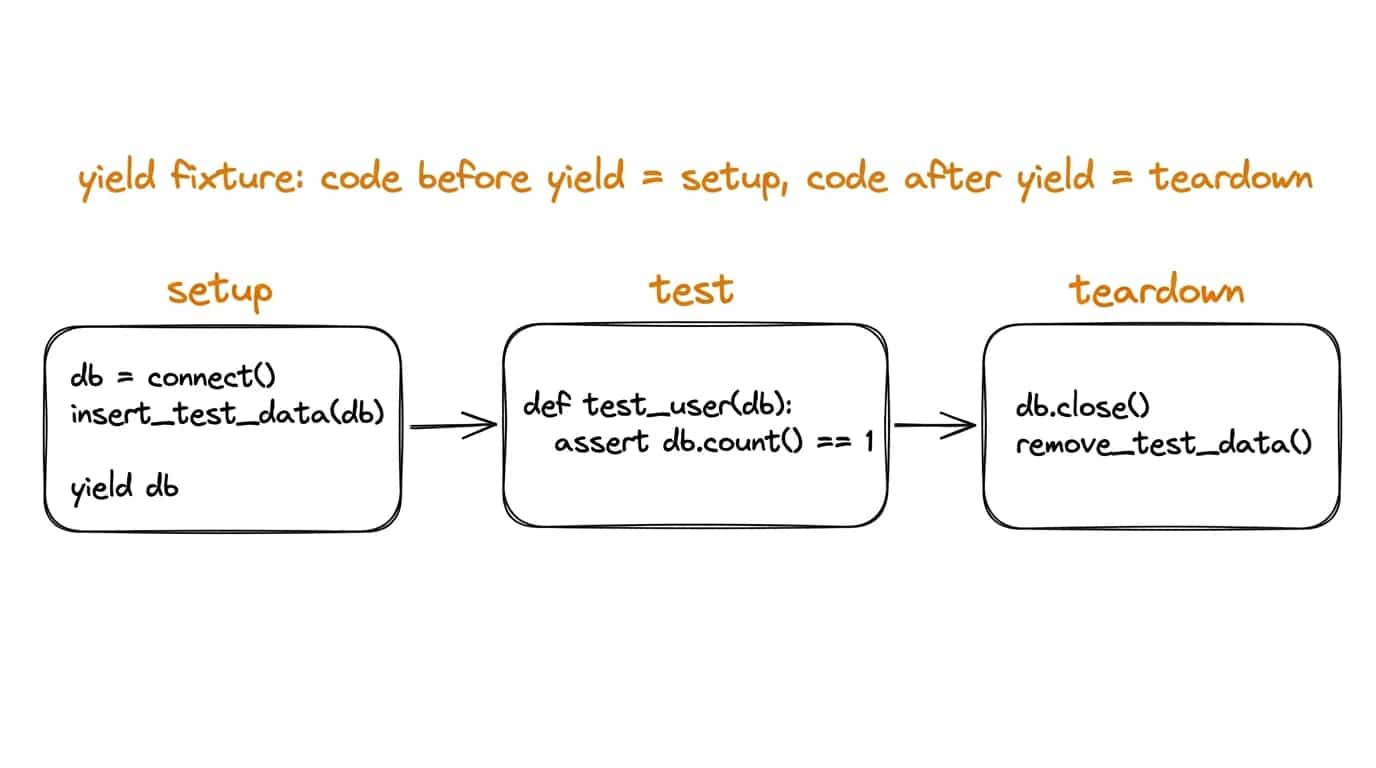
If you need to perform actions after the test has finished (e.g., close a database connection or delete a temporary file), use yield in the fixture.

test_fixture_yield.py
1import os2 3import pytest4 5@pytest.fixture6def temp_file_fixture():7file_path = "temp_test_file.txt"8print(f"\n(Fixture: creating file ${file_path})")9with open(file_path, "w") as f:10f.write("Hello, pytest!")11 12    yield file_path  # the test receives this value13 14    print(f"\n(Fixture: deleting file ${file_path})")15    os.remove(file_path)16 17def test_read_temp_file(temp_file_fixture):18file_path = temp_file_fixture # get the file path from the fixture19print(f"(Test: reading file ${file_path})")20with open(file_path, "r") as f:21content = f.read()22assert content == "Hello, pytest!"23 

The code before yield runs before the test (setup), and the code after yield runs after the test (teardown).

Fixture Scopes (scope)

By default, a fixture runs for every test function that requests it. This behavior can be changed using the scope parameter in the @pytest.fixture decorator.

Available scopes:

  • function (default): Fixture runs once per test function.
  • class: Fixture runs once per test class.
  • module: Fixture runs once per module.
  • package: Fixture runs once per package (Python 3).
  • session: Fixture runs once for the entire test session.
test_scopes.py
1import pytest2 3@pytest.fixture(scope="session")4def session_db_connection():5print("\n(session_db_connection: establishing DB connection — ONCE PER SESSION)")6connection = {"status": "connected"} # simulated connection7yield connection8print("\n(session_db_connection: closing DB connection — ONCE PER SESSION)")9 10@pytest.fixture(scope="module")11def module_data_setup(session_db_connection): # This fixture depends on session_db_connection12assert session_db_connection["status"] == "connected"13print("\n(module_data_setup: setting up module data — ONCE PER MODULE)")14data = {"module_id": 123}15yield data16print("\n(module_data_setup: cleaning up module data)")17 18class TestUserOperations:19def test_user_create(self, module_data_setup, session_db_connection):20print("(Test test_user_create)")21assert session_db_connection["status"] == "connected"22assert module_data_setup["module_id"] == 12323 24    def test_user_view(self, module_data_setup, session_db_connection):25        print("(Test test_user_view)")26        assert session_db_connection["status"] == "connected"27        assert module_data_setup["module_id"] == 12328 29def test_another_operation(module_data_setup, session_db_connection):30print("(Test test_another_operation in the same module)")31assert session_db_connection["status"] == "connected"32assert module_data_setup["module_id"] == 12333 

Choosing the correct scope helps optimize test execution by avoiding unnecessary setup repetitions.

Shared Fixtures: conftest.py

If you have fixtures that you want to use across multiple test files, you can define them in a special file named conftest.py. pytest automatically discovers this file.

  • The conftest.py file should be located in the test directory or a parent directory.
  • Fixtures defined in conftest.py become available to all tests in that directory and its subdirectories without needing to be imported.

Example: the global_app_config fixture lives in conftest.py, and a test in test_module_one.py receives it as an argument — no import required.

test_module_one.py
1def test_api_url(global_app_config): # fixture from conftest.py is available here2print(f"(Test test_api_url: using ${global_app_config['api_url']})")3assert "example.com" in global_app_config["api_url"]4 

Automatic Fixture Usage (autouse)

Sometimes, a fixture needs to run for all tests within a specific scope, even if the tests don't explicitly request it. The autouse=True parameter is used for this.

conftest.py
1import time2 3import pytest4 5@pytest.fixture(autouse=True, scope="session")6def print_start_end_session():7print("\n--- STARTING TEST SESSION ---")8yield9print("\n--- ENDING TEST SESSION ---")10 11@pytest.fixture(autouse=True, scope="function")12def track_test_duration():13start_time = time.time()14yield15duration = time.time() - start_time16print(f"(Test duration: ${duration:.4f} sec.)")17 

Use autouse with caution, as it can make test dependencies less explicit.

Parametrization: One Test, Many Runs 🔄

Often, you need to test the same logic with different sets of input data and expected results. Instead of writing multiple nearly identical tests, pytest offers parametrization using the @pytest.mark.parametrize marker.

test_parametrize_example.py
1import pytest2 3from discount import get_discount4 5@pytest.mark.parametrize(6"age, is_member, expected_discount", # argument names in the test function7[8(70, False, 0.15), # test case 19(30, True, 0.10), # test case 210(16, False, 0.05), # test case 311(25, False, 0.0), # test case 412(65, True, 0.15), # senior member still gets senior discount13pytest.param(10, True, 0.05, id="JuniorMember"),14],15)16def test_get_discount_parametrized(age, is_member, expected_discount):17assert get_discount(age, is_member) == expected_discount18 

In this example:

  • The test_get_discount_parametrized test will run multiple times, once for each tuple of values in the list.
  • pytest.param(...) can be used to assign a custom ID to a test case, improving output readability with many parameters.

Combining Fixtures and Parametrization

Fixtures and parametrization can be used together to create very flexible test scenarios.

test_fixtures_and_parametrize.py
1import pytest2 3@pytest.fixture4def user_profile_factory():5def _create_profile(name, role="viewer"):6return {"username": name, "role": role, "permissions": []}7 8    return _create_profile9 10@pytest.mark.parametrize(11"role_to_assign, expected_permission_count",12[13("admin", 5),14("editor", 3),15("viewer", 1),16],17)18def test_user_permissions_after_role_assignment(19user_profile_factory,20role_to_assign,21expected_permission_count,22):23profile = user_profile_factory(name="testuser")24 25    # Simulate permission assignment logic based on role26    if role_to_assign == "admin":27        profile["permissions"] = ["read", "write", "delete", "manage_users", "publish"]28    elif role_to_assign == "editor":29        profile["permissions"] = ["read", "write", "publish"]30    elif role_to_assign == "viewer":31        profile["permissions"] = ["read"]32 33    profile["role"] = role_to_assign34 35    assert profile["role"] == role_to_assign36    assert len(profile["permissions"]) == expected_permission_count37 38 

What's Next?

Fixtures and parametrization are the bread and butter of effective testing with pytest. By mastering them, you can write clean, maintainable, and comprehensive tests.

In the next article, we will look at how to isolate our tests from external dependencies using mocks and stubs.


Which statement about fixtures and parametrization in pytest is correct?